Atlas for iPhone & Android

A word a day,
right on your screen.

Turn every glance at your phone into a tiny vocabulary lesson. The Atlas word of the day widget brings definitions, examples, and saved words to your Home Screen on iPhone and Android—with Lock Screen widgets and quick quizzes on iPhone.


Download on the App StoreGet it on Google Play
iPhone + AndroidHome Screen widgetsiPhone Lock ScreenUpdates daily
Illustration for the word congregate
WORD OF THE DAY

congregate

verb/ˈkɑːŋɡrɪɡeɪt/

to come together in a group; gather

One glance. One new word.

No streak pressure. Learn in your own rhythm.

Your words return. Review what you saved.

More than one widget

Choose the kind of practice you need today.

Start with a new word, revisit your journal, or answer a quick question. Atlas keeps useful vocabulary where you already look.

01 · Discover · iPhone + Android

Word of the Day

A fresh word, its meaning, and pronunciation—updated daily.

Illustration for the word congregate
congregateverbto come together in a group; gather
02 · Remember · iPhone + Android

Journal Words

Bring words you saved back into view before they fade.

12
FROM YOUR JOURNALmeticulous

showing great attention to detail

03 · Practise · iPhone

Quick Quiz

Test your recall in a spare moment, straight from the widget.
Which word means “quick to notice”?
astuteplacidterse
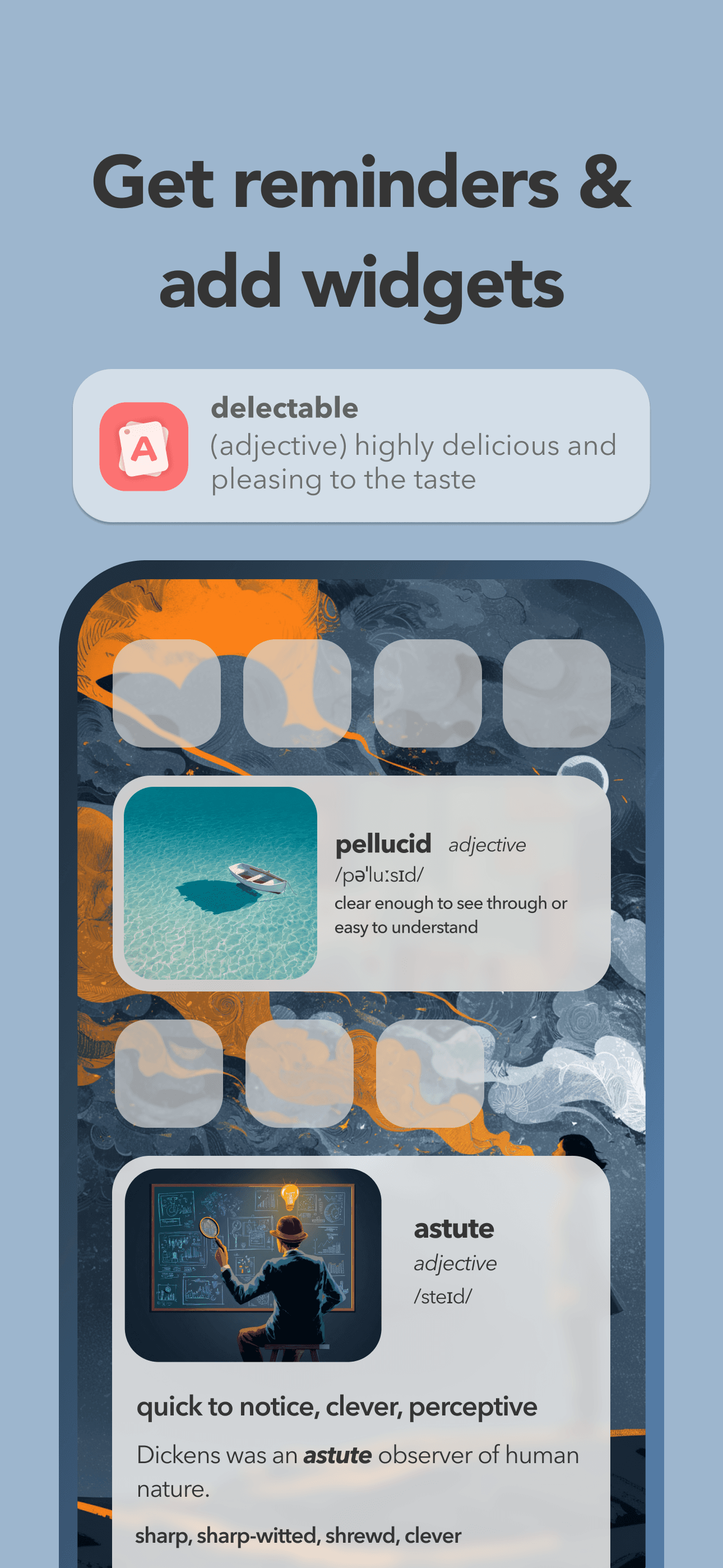
Atlas word widgets and vocabulary reminders on a phone Home Screen
Built for real life

Learn even when you forget to study.

You already check your phone dozens of times a day. Atlas uses those small moments to keep English words familiar—without asking you to begin a full lesson.

  • 01
    Sized for your screen

    Choose small, medium, or large on iPhone, or resize the widget on Android.

  • 02
    Home Screen on iPhone and Android

    See today's word or browse saved journal words on either platform.

  • 03
    iPhone Lock Screen

    Place today's word and a journal word directly beneath the clock.

iPhone Lock Screen vocabulary widgets

Two useful words, every time you look.

Place today's word beside a word from your journal. Each widget can show the detail you choose—definition, pronunciation, example, synonyms, origin, or translation.

Saturday, September 26
9:41
congregate(v.) to come together in a group; gather
guarded(adj.) cautious about revealing information
How to add the Atlas widget

On your screen in three steps.

  1. 1

    Download Atlas

    Install Atlas on your iPhone or Android phone and open it once.

  2. 2

    Open the widget gallery

    Touch and hold the Home Screen. Choose Add Widget on iPhone or Widgets on Android.

  3. 3

    Search for Atlas

    Choose your widget and size, then place it wherever you like.

Questions, answered

Word of the day widget FAQ

Does the Atlas word of the day widget update automatically?

Yes. The Word of the Day widget refreshes with the current Atlas daily word, so a new vocabulary prompt can appear without you choosing it manually.

Can I use Atlas as a Lock Screen vocabulary widget?

Yes, on iPhone. Atlas includes rectangular Lock Screen widgets for today's word and saved journal words.

Can the widget show words from my journal?

Yes. Journal widgets bring back words you saved in Atlas, helping you review vocabulary you personally want to remember.

Is there a vocabulary quiz widget?

Yes, on iPhone. The Atlas quiz widget gives you a quick vocabulary question so you can practise recall from your Home Screen.

Are Atlas vocabulary widgets available on Android?

Yes. Android includes resizable Word of the Day and Journal Words widgets for the Home Screen.

Which widget sizes are available?

iPhone supports small, medium, and large Home Screen widgets plus rectangular Lock Screen widgets. Android Home Screen widgets can be resized horizontally and vertically.

A better thing to see when you check your phone.

Put your next English word on your screen.

Download Atlas and add the vocabulary widget that fits the way you learn.

Download on the App StoreGet it on Google Play